Incident Creation API
The Incident Creation API provides a secure and streamlined way for external applications to submit incident reports. By utilizing a two-step verification process involving time-limited CSRF tokens and AES encryption, the API ensures that all data submissions are authentic, authorized, and protected against common web vulnerabilities.
Sequence Diagram
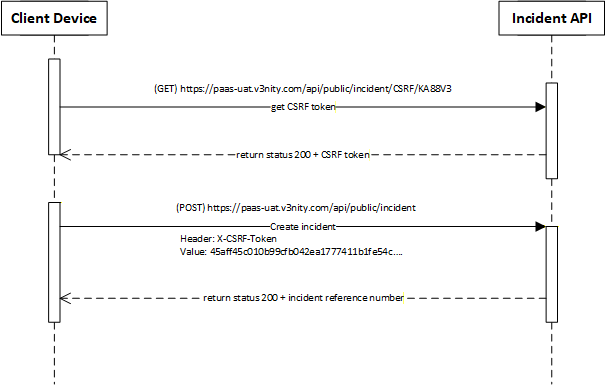
The following diagram illustrates the secure submission flow. A client must first obtain a unique CSRF token before submitting the incident data via a POST request.
| Step | Action | Description |
|---|---|---|
| 1 | GET CSRF Token | The client device requests a token from the CSRF endpoint. The API validates the serial key and returns an encrypted token. |
| 2 | Create Incident | The client submits the incident details via a POST request, including the token in the X-CSR-Token header. |
| 3 | Response | The API processes the report and returns a unique incident reference number. |
Endpoints
GET /public/incident/csrf/{serialKey}
Generates and returns a CSRF token as plain text. This token is mandatory for the subsequent POST request and expires after 5 minutes.
Response Example
45aff45c010b99cfb042ea1777411b1fe54c8293847561029384756102938475...Note: The response is a plain text hex string containing the IV and the encrypted payload.
Incident Submission
POST /public/incident
Submits the final incident report. This request requires a valid CSRF token to be included in the headers to prevent Cross-Site Request Forgery attacks.
Required Headers
| Header | Description | Required |
|---|---|---|
X-CSRF-TOKEN |
The encrypted token obtained from the CSRF endpoint. | Mandatory |
Content-Type |
application/json |
Mandatory |
JSON Payload Schema
| Field | Type | Status | Description |
|---|---|---|---|
name |
String | Mandatory | Name of the person reporting (Max 100 chars). |
email |
String | Optional | Valid email format. |
other_area |
String | Optional | Additional area information (Max 100 chars). |
description |
String | Mandatory | Description of the incident (Max 500 chars). |
rating |
String | Optional | Rating provided by the user (Max 50 chars). |
improvements |
String | Optional | Suggested improvements (Max 500 chars). |
priority_id |
String | Optional | Encrypted Priority ID. |
site_id |
String | Optional | Encrypted Sector (Site) ID. Can be obtained from the Feedback Location API. |
building_id |
String | Optional | Encrypted Route (Building) ID. Can be obtained from the Feedback Location API. |
level_id |
String | Optional | Encrypted Road (Level) ID. Can be obtained from the Feedback Location API. |
area_id |
String | Optional | Encrypted Area ID. Can be obtained from the Feedback Location API. |
site_text |
String | Optional | Plain text Sector (Site) name for lookup. |
building_text |
String | Optional | Plain text Route (Building) name for lookup. |
image1 |
String | Optional | First attached image (Base64 PNG/JPG). |
image2 |
String | Optional | Second attached image (Base64 PNG/JPG). |
video_link |
String | Optional | Link to an associated video. |
reported_time |
String | Optional | ISO-8601 format (e.g., 2026-01-26T10:15:30+08:00). |
Location Configuration
The physical hierarchy (Sectors, Routes, Roads, Areas) used in the _id fields is managed via the WAM360 application (https://wam360.v3nity.com). Use the Feedback Location API to retrieve the valid IDs for your tenant.
Request Example
{
  "name": "John Doe",
  "email": "john.doe@example.com",
  "other_area": "North Sector Pantry",
  "description": "Water leakage in the main lobby.",
  "rating": "Urgent",
  "improvements": "Fix the pipe immediately.",
  "priority_id": "8A2F3B1C9D0E4F5A6B7C8D9E0F1A2B3C",
  "site_id": "1A2B3C4D5E6F7G8H9I0J1K2L3M4N5O6P",
  "building_id": "Z1Y2X3W4V5U6T7S8R9Q0P1O2N3M4L5K6",
  "level_id": "A1B2C3D4E5F6G7H8I9J0K1L2M3N4O5P6",
  "area_id": "Q1W2E3R4T5Y6U7I8O9P0A1S2D3F4G5H6",
  "site_text": "North Sector",
  "building_text": "Route 101",
  "image1": "data:image/png;base64,iVBORw0KGgoAAAANSUhEUgAAAAEAAAABCAYAAAAfFcSJAAAADUlEQVR42mP8z8BQDwAEhQGAhKmMIQAAAABJRU5ErkJggg==",
  "image2": "data:image/png;base64,iVBORw0KGgoAAAANSUhEUgAAAAEAAAABCAYAAAAfFcSJAAAADUlEQVR42mP8z8BQDwAEhQGAhKmMIQAAAABJRU5ErkJggg==",
  "video_link": "https://storage.v3nity.com/v/12345",
  "reported_time": "2026-03-27T22:30:00+08:00"
}
Status Codes
| Code | Description |
|---|---|
| 200 OK | Request processed successfully. The incident reference is returned in the Inc-Ref header. |
| 400 Bad Request | Invalid payload, missing token, or validation error (e.g., name too long, invalid email, incident already submitted). |
| 401 Unauthorized | Missing or invalid CSRF token. |
| 500 Internal Server Error | An unexpected error occurred on the server. |