Feedback Location API
The Feedback Location API provides a hierarchical list of physical locations (Sectors, Routes, Roads, and Areas) configured for a tenant. This data is typically used to populate cascading dropdown menus in feedback or incident reporting forms, allowing users to precisely specify where an event occurred.
Terminology Mapping
In the context of waste management, the generic system entities are mapped to the following domain-specific terms:
| System Term | Domain Mapping |
|---|---|
Site |
Sector |
Building |
Route |
Level |
Road |
Area |
Area |
Base URL
All requests to the Feedback Location API should be made to the following endpoint:
Authentication
This API requires a valid CSRF token obtained from the Incident or Feedback initialization flow. The token must be passed in the custom header.
| Header | Value | Description |
|---|---|---|
X-CSR-TOKEN |
<ENCRYPTED_TOKEN> |
Mandatory. The token obtained during session initialization. |
Request Headers
| Header | Value | Description |
|---|---|---|
Accept |
application/json |
Recommended for all requests. |
JSON Response Schema
The API returns a flat JSON array of location objects. The hierarchy is established via the parent_id and level fields.
| Field | Type | Description |
|---|---|---|
id |
String | The encrypted unique identifier for the location. |
name |
String | The display name of the location. |
parent_id |
String | The encrypted ID of the parent location. For top-level Sectors, this value is an encrypted 0. |
level |
Integer | The depth in the hierarchy: 1 (Sector), 2 (Route), 3 (Road), 4 (Area). |
Response Example
[
  {
    "id": "8A2F3B1C9D0E4F5A6B7C8D9E0F1A2B3C",
    "name": "North Sector",
    "parent_id": "Q1W2E3R4T5Y6U7I8O9P0A1S2D3F4G5H6",
    "level": 1
  },
  {
    "id": "1A2B3C4D5E6F7G8H9I0J1K2L3M4N5O6P",
    "name": "Route 101",
    "parent_id": "8A2F3B1C9D0E4F5A6B7C8D9E0F1A2B3C",
    "level": 2
  },
  {
    "id": "Z1Y2X3W4V5U6T7S8R9Q0P1O2N3M4L5K6",
    "name": "Main Road",
    "parent_id": "1A2B3C4D5E6F7G8H9I0J1K2L3M4N5O6P",
    "level": 3
  }
]
Sample Feedback Form
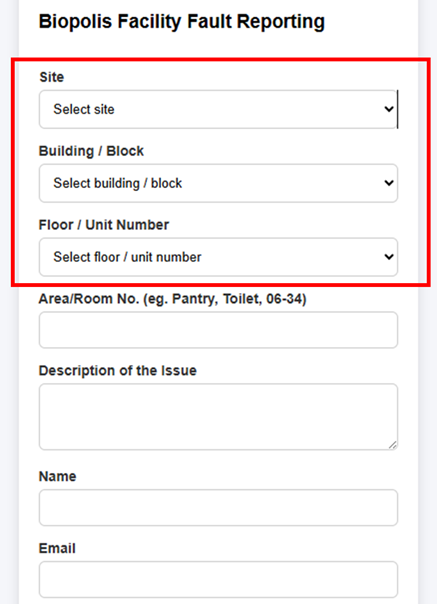
The following image demonstrates how the hierarchical location data is typically implemented in a user interface. By filtering the list based on the parent_id and level, developers can create a seamless cascading selection experience.
Configuration via WAM360
The physical hierarchy of Sectors, Routes, Roads, and Areas is centrally managed through the WAM360 application. This configuration defines the organizational structure used for Bin tracking, incident reporting, and feedback management across the entire V3nity ecosystem.
Administrators can access the configuration portal at: https://wam360.v3nity.com.
Hierarchical Implementation
The location data follows a strict four-level hierarchy. Each level depends on the selection of its parent:
| Level | Entity | Logic |
|---|---|---|
| Level 1 | Sector (Site) | The root of the hierarchy. These records have a parent_id representing an encrypted 0. |
| Level 2 | Route (Building) | Specific routes within a Sector. Filtered where parent_id matches the selected Sector's id. |
| Level 3 | Road (Level) | Roads or vertical divisions. Filtered where parent_id matches the selected Route's id. |
| Level 4 | Area | Specific zones. Filtered where parent_id matches the selected Road's id. |
Status Codes
| Code | Description |
|---|---|
| 200 OK | Request processed successfully. |
| 400 Bad Request | Missing or invalid CSRF token. |
| 500 Internal Server Error | An unexpected error occurred on the server. |